How can we configure Netgear Extender ?????

Steps to configure Netgear Extender : 

1. we need a laptop and router to configure extender.
2. first of all we need to connect laptop to router with hardwired.
3. Reset Netgear Extender to push and hold reset button for 30 seconds using pen or paper clip.

4. After reset extender , we need to connect extender with laptop (Wireless Network) and name of the extender is Netgear_Ext (Default name after reset extender)

5.After that we need to open Command prompt and then, type ipconfig to identify the default ip address of extender (under wireless network adapter).

6. Open Extender home page using default IP address of extender (192.168.1.XX).

7. Then it will automatically setup your extender and then it will ask you to enter router network name (SSID) and password (Network Key).

8. It will automatically configure your extender with router and then extender will provide to SSID and Network Key or Password to connect the devices with Wireless Network of Extender.

9. Then you can connect your laptop or any device with the information given by extender.

Belkin Router Images with reset button.......


What is a KVM Switch?

KVM stands for Keyboard, Video and Mouse, and a KVM Switch allows you to control two or more computers from a single keyboard, monitor and mouse. KVM Switches are sometimes also known as PC Switches, Server Switches and CPU Switches.

Cisco E series router Diagram......

       Linksys E Series Router

Linksys E series router reset button


reset button

Netgear router Diagram..


Netgear Router

how to configure wireless router on windows xp ??


How to Connect a Computer to a Secure Wireless Network using Windows® XP to surf (browse) the Internet
Basic Requirements:
 An active high-speed Internet connection (Cable or DSL: dial-up is not high-speed and is not covered in this setup)
 A cable modem or DSL modem (usually provided by your Internet Service Provider)
 A wireless access point (sometimes called a wireless router)connect to wireless router

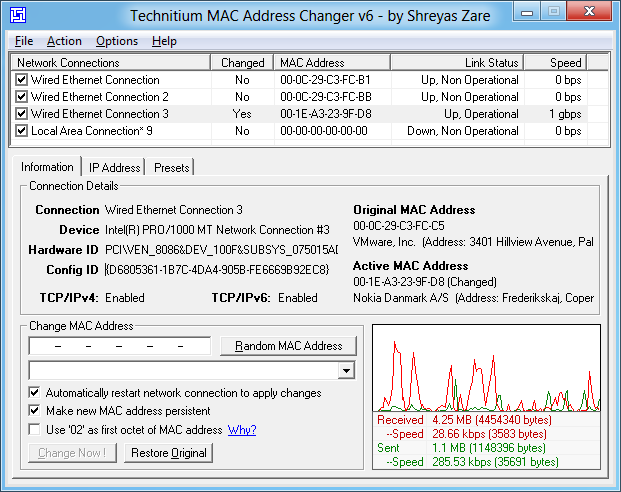
Technitium MAC Address Changer ?

Technitium MAC Address Changer


Version: 6.0.3
 
System Requirements:Windows 2000/XP/Server 2003/Vista/Server 2008/7/Server 2008 R2/8 (Developer Preview)
 
Cost: FREEWARE

Technitium MAC Address Changer allows you to change (spoof) Media Access Control (MAC) Address of your Network Interface Card (NIC) irrespective to your NIC manufacturer or its driver. It has a very simple user interface and provides ample information regarding each NIC in the machine. Every NIC has a MAC address hard coded in its circuit by the manufacturer. This hard coded MAC address is used by windows drivers to access Ethernet Network (LAN). This tool can set a new MAC address to your NIC, bypassing the original hard coded MAC address. Technitium MAC Address Changer is a must tool in every security professionals tool box.
There are some famous, commercial tools available in the market for USD 39.99 to as much as USD 2499!, but Technitium MAC Address Changer is available for FREE. We don't charge for just changing a registry value! Also knowing how this works doesn't require extensive research as some commercial tool providers claim! Read how it works (below) for more details.

 
Copyright © downloads'n'fix - Blogger Theme by BloggerThemes & freecsstemplates - Sponsored by Internet Entrepreneur